
How to Convert Image from MB to KB (50KB, 100KB) Online – Free & Fast
Convert image from MB to KB instantly for SSC, UPSC, and online forms. Compress photos to 50KB or 100KB without losing quality. 100% free tool.
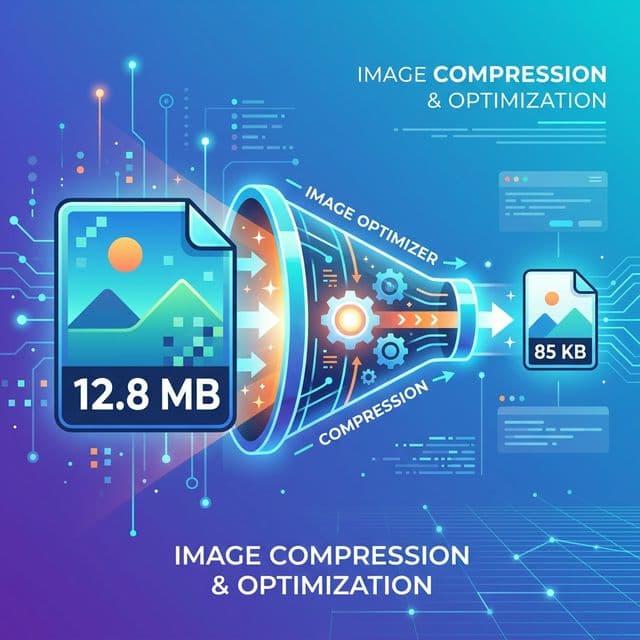
Have you ever tried to upload a photo for a government job application, a bank exam, or a college admission form, only to see a frustrating red error message: "File size too large"? If you are nodding your head right now, you are not alone. Every single day, thousands of students and job seekers face this exact problem. They have a brilliant, clear photograph or signature saved on their phone, but the file size is in Megabytes (MB). However, the official online portal strictly demands the file to be under 20KB, 50KB, or 100KB.
This is exactly why learning how to convert image from MB to KB is a mandatory skill in today's digital world. Whether you are applying for SSC, UPSC, IBPS, RRB, or even submitting documents for passport renewal, this guide is your ultimate lifeline.
In this comprehensive, easy-to-understand 2000-word guide, we are going to break down everything. We will explain what MB and KB mean, why government portals are so strict about image sizes, and most importantly, how to use our 100% free image size reducer online to compress your photos without losing any clarity or quality. Grab a cup of tea, and let’s dive deep into the world of photo compression!
1. The Big Problem: Why Do Portals Reject MB Images?
Before we talk about the solution, we must understand the problem. Why do websites like the Staff Selection Commission (SSC) or Union Public Service Commission (UPSC) refuse to accept your 3MB or 5MB selfie?
The Cost of Storage
Imagine a government recruitment drive where 20 lakh (2 million) students are applying for a clerk position. If every student uploads a high-definition 5MB photograph and a 2MB signature, the total data the server has to store jumps to 14 million Megabytes. That is over 14 Terabytes of raw data just for tiny passport photos! Storing this much data is incredibly expensive and slows down the website for everyone else trying to apply.
Server Speed and Bandwidth
When an examiner or a software system has to download and review your application, a smaller file loads instantly. A 50KB file takes a fraction of a millisecond to load on a 4G connection. On the other hand, loading a heavy 5MB image delays the system. By forcing you to compress photo to 50KB, the official portal ensures that their servers run smoothly without crashing on the last day of the application deadline.
Fairness for Rural Applicants
Not everyone has access to high-speed broadband internet. Many applicants from rural areas rely on slow mobile data networks to fill out their forms. A lightweight webpage with optimized, KB-sized images ensures that everyone, regardless of their internet speed, has a fair chance to submit their application successfully.
🚀 Free ToolFree MB to KB Converter – Try Now!Open Tool →2. Understanding the Basics: MB vs. KB Explained
If you are not a computer expert, these terms might sound like alien language. But it is actually very simple mathematics. Here is a breakdown suitable for a 9th-grade student:
- Byte (B): The smallest unit of digital data. A single letter 'A' in a text file is about 1 Byte.
- Kilobyte (KB): One Kilobyte is mathematically equal to 1,024 Bytes. Think of a KB as a single page of text in a notebook.
- Megabyte (MB): One Megabyte is equal to 1,024 Kilobytes. This is huge! Think of an MB as a thick, heavy novel.
When you take a picture with a modern smartphone—like an iPhone or an Android device with a 48-megapixel camera—the camera captures millions of colors and tiny details. Because of this extreme detail, the phone saves the image file as a massive 3MB, 5MB, or even 10MB chunk of data.
But a passport photo on an application form is tiny. It is usually printed in a 3.5cm x 4.5cm box. You absolutely do not need 5 million pixels to show what your face looks like in a tiny box. This is why you must reduce picture size and strip away the invisible, unnecessary data.
3. How to Convert Image from MB to KB Online (Step-by-Step)
The internet is full of tools, but many of them ask you to pay, add ugly watermarks to your face, or force you to download suspicious software apps. SmartToolsWala offers a mb to kb converter online without losing quality that is completely web-based, highly secure, and 100% free forever.
Here is the ultimate, fail-proof guide to compressing your photo perfectly on the first try:
Step 1: Prepare Your Original Document
Before you compress, you must have a good starting point. Find a well-lit room, stand against a plain white or light-blue wall, and ask someone to take your photo. Make sure you are facing the camera directly, not wearing dark glasses, and your ears are clearly visible. If you are snapping a photo of your signature, use a black or dark blue pen on unlined, blank white paper.
Step 2: Open the SmartToolsWala Converter
Open your Google Chrome, Safari, or mobile browser and navigate to our MB to KB Converter. You do not need to log in, create an account, or share your email ID. The tool is ready the second the page loads.
Step 3: Upload Your File
Click on the large "Upload" box or simply drag and drop your massive MB file right into the screen. Because our tool works directly inside your browser using advanced JavaScript technology, your private photo never actually leaves your phone. It is optimized locally, guaranteeing your privacy.
Step 4: Choose Your Target Size (e.g., 50KB or 100KB)
This is where the magic happens. A slider or a dropdown menu will appear. If your exam notification says "Photo size must be between 20KB and 50KB", simply select or type 50KB into the target box. Our intelligent algorithm will calculate the exact amount of compression needed to reach that strict limit without destroying the clarity of your face.
Step 5: Click Compress and Download
Hit the "Compress" button. In less than two seconds, the tool will instantly strip the unnecessary heavy data blocks (like metadata, invisible color profiles, and microscopic high-frequency details) from your image. A download button will appear with your fresh, lightweight KB file ready to be saved.
✅ Free ToolCompress Image to 50KB – Free & Instant!Open Tool →4. Specific Guide: Shrink Image Size for SSC and RRB (The 50KB Rule)
The Staff Selection Commission (SSC) and Railway Recruitment Board (RRB) govern some of the most highly anticipated exams in India, including CGL, CHSL, MTS, and Group D. Every year, millions of applications are rejected simply because students uploaded blurry or incorrectly sized photos.
The Golden Rules for SSC Photos:
- Allowed Size limit: Between 20 KB and 50 KB exactly.
- Allowed Dimensions: 3.5 cm (width) x 4.5 cm (height).
- Allowed Format: Strictly JPEG/JPG format. PNGs will be rejected.
- Date on Photo: Sometimes a printed date is required at the bottom (always read the latest official PDF notice).
How to avoid rejection at the SSC portal:
- Do not use random WhatsApp photos. WhatsApp compression kills edge sharpness, which makes the photo rejected by the SSC AI scanner.
- Put your original uncompressed image into our jpg compressor to 50kb.
- The tool lowers the image data weight while keeping your facial features critically sharp. Because the system retains edge contrast, the SSC portal accepts it instantly without throwing the dreaded "Resolution too low" error.
5. Specific Guide: Photo Compression for UPSC and State PSCs (The 100KB Rule)
The Union Public Service Commission (UPSC) forms—including Civil Services (IAS), NDA, and CDS—are slightly more generous but strictly enforced.
The Golden Rules for UPSC Photos:
- Allowed Size limit: Not more than 300 KB and not less than 20 KB. However, experts recommend targeting exactly 100KB for the fastest and safest upload.
- Allowed Format: JPEG format only.
- Bit Depth: 24-bit color.
When you compress photo to 100KB, you have a lot more breathing room to retain high quality. This is vital because UPSC requires the photo to closely match your face on the day of the grueling interview rounds. A badly compressed, pixelated face will cause extreme hassle at the examination center's verification gate. Our 100KB optimizer precisely tunes the JPEG quality metric to exactly 85%, which is broadly considered the perfect balance between minimal file weight and crystal-clear visual quality.
⚡ Free ToolCompress Image to 100KB – High Quality!Open Tool →6. The Science: MB to KB Converter Online Without Losing Quality
You might be asking a very logical question right now: "If my file goes from 5,000 KB (5MB) down to just 50 KB, where does the rest of the data go? Won't my photo look terrible?"
It is a great question. The answer lies in the brilliant computer science field called Lossy Compression Optimization.
A digital photograph is basically a massive grid of colored squares called pixels. A 5MB photo might have 12 million squares! Your eye cannot see 12 million squares on a 6-inch phone screen or a printed admit card.
When you use our image size reducer, the tool does three highly intelligent things instantly:
- Chroma Subsampling: Human eyes are very good at seeing changes in brightness (black vs white), but we are terrible at noticing tiny shifts in colors. The compressor slightly groups identical colors together. If there are 50 shades of dark blue in your shirt, the tool mathematically turning them into just 5 shades of dark blue saves massive amounts of data, and your eye literally cannot tell the difference!
- Metadata Stripping: When you take a smartphone photo, your phone hides invisible text data inside the image. This data (called EXIF data) records your GPS location, the time of day, the phone model, and camera aperture. Government portals do not care about your phone model. Our tool deletes this heavy text, shedding kilos of KB weight instantly.
- Resampling: If your image is 4000 pixels wide, it is unnecessarily huge. The tool safely resizes the photo to match standard web dimensions (like 600 pixels wide), dramatically dropping the size from Megabytes to Kilobytes while keeping the image looking HD on a monitor.
Therefore, when we say you can reduce picture size without losing quality, we mean you will not lose perceived quality. The file becomes light, but to your human eye, it looks exactly the same.
7. Common Pitfalls and Mistakes to Avoid
Even with the best tools, applicants make silly mistakes all the time. Here is a checklist to ensure your form is accepted on the very first try:
- Do not use screenshot apps. Screenshots are usually saved in the PNG format. PNGs are extremely heavy and hard to compress compared to JPGs. If you have a screenshot, you must convert it to JPG before trying to hit the 50KB limit.
- Do not wear spectacles if possible. Even if you wear glasses daily, flash glare on the glass lenses often triggers rejection.
- Avoid dark backgrounds. Your background must be plain white or off-white. Busy backgrounds confuse compression algorithms, resulting in a larger file size because there is too much detail (like trees or curtain folds) to compress seamlessly.
- Do not use filters. Instagram or Snapchat filters distort the digital signature of the photo. Government face-matching AI algorithms will flag filtered photos, risking your entire application.
8. Why SmartToolsWala is the Ultimate Solution
We built this suite of completely free imaging tools specifically aiming to help students, government job aspirants, and ordinary citizens deal with rigid web forms.
Unlike heavy PC software like Photoshop which takes months to learn, our resize photo for ssc platform is a one-click wonder.
- Zero Cost: Never pay a single rupee. No premium tiers, no hidden subscriptions.
- Privacy First: We respect your documents. Everything processes locally in your browser logic. We do not have servers storing your PAN cards or passport photos.
- Blazing Fast: No waiting in server queues. Compression happens on your own device's processor in milliseconds.
If you are stuck on an application form right now, stop stressing. Scroll up, click any of our tool buttons, and shrink your image seamlessly.
Frequently Asked Questions (FAQs)
1. How can I safely convert my photo from MB to KB without losing clarity?
Use a specialized smart compression tool like ours. By uploading your photo and selecting a target like 50KB or 100KB, the tool uses chroma subsampling to drastically reduce the file weight while perfectly preserving the visible sharpness of your face.
2. Can I use this image size reducer on my smartphone?
Yes, absolutely! The tool is entirely web-based and fully responsive. It works flawlessly on Android phones, iPhones, iPads, and desktop computers without having to download any application from the Play Store.
3. Will this tool change my photo to JPG format?
Yes. If you upload a PNG or WEBP file that is in MBs, our tool compresses it and automatically forces the output download to be a standard .jpg file, which is universally accepted by all SSC, UPSC, and bank portals.
4. What is the exact difference between resizing and compressing?
Resizing changes the physical dimensions of the photo (for example, making a 1080p image a smaller 500p image). Compressing keeps the physical dimensions but reduces the digital data weight (from 4MB down to 40KB) by optimizing colors and deleting hidden metadata. Our tool handles both simultaneously.
5. Why is the government portal rejecting my exact 50KB photo?
Sometimes portals have a strict limit of "Under 50KB", meaning a file that is exactly 50.01KB will be rejected. To be completely safe, if the limit is 50KB, use our tool and set the target to 45KB to ensure there are no upload errors whatsoever.
Written by
Abhishek Baghel
Related Articles
Instagram Bio: 3000+ Best, Stylish, Attitude & VIP Bios for Boys & Girls (2026)
Looking for the ultimate list of Instagram bios? Get 3000+ copy-paste Instagram bios including attitude, classy, stylish font, simple, VIP bios for boys and girls.
20 Gemini AI Photo Prompts Copy & Paste for Stunning Images (2026)
Get 20+ viral, hyper-realistic, and stunning Gemini AI photo generation prompts to copy and paste. Elevate your AI art game instantly.
Instagram Bio for Boys: 500+ Stylish, Attitude & Cool Bio Ideas for 2026
Discover 500+ Instagram Bio For Boys including attitude, stylish, VIP, cool, trending and emoji bios. Copy and use instantly.