
Why Image Size Matters: MB vs KB Explained Simply
Confused about MB and KB? Learn exactly what Megabytes and Kilobytes are, why your phone's camera makes files so large, and how to shrink them safely.
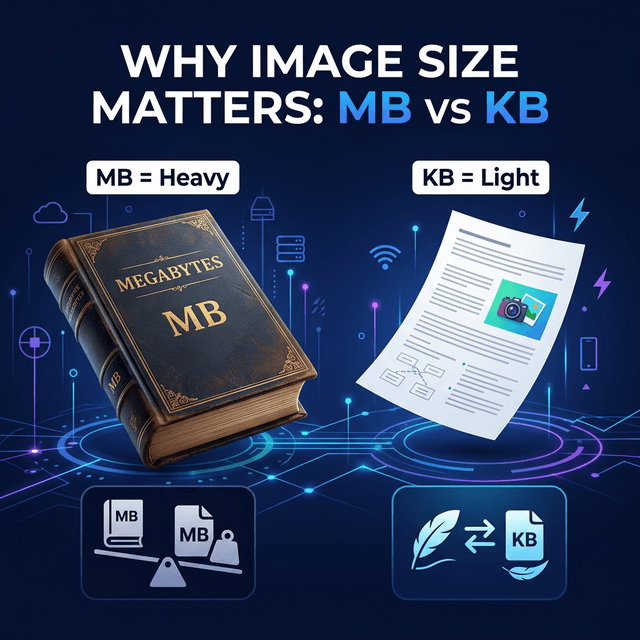
Imagine you are trying to stuff an enormous, fluffy pillow into a tiny shoebox. No matter how hard you push, it just won't fit perfectly without breaking the box.
When you use the internet, computer files act exactly the same way. The internet has tiny "boxes" (storage spaces), and sometimes, the pictures we take on our modern smartphones are like giant fluffy pillows. When we try to put a giant picture on the internet, the internet says, "Stop! This is too big!"
To understand why this happens, we must learn the language of computers. We must understand two very famous letters: MB and KB.
In this easy guide, we will break down what these letters mean, why they are so important, and why you should care about image compression. By the end of this article, you will be a file size expert!
The Alphabet of Computers: Bytes
To understand MB and KB, we have to start at the very, very beginning. We have to talk about Bytes.
A computer does not understand English, Hindi, or Spanish. A computer only understands two numbers: 0 and 1. That is it! These tiny zeros and ones are the brain of every machine.
- One single
0or1is called a Bit. - When you group 8 Bits together, they make a Byte.
A Byte is the smallest actual building block of memory. Think of a Byte as a single grain of sand. A grain of sand is very small, almost invisible. But if you gather enough grains of sand, you can build a massive, heavy castle.
What is a Kilobyte (KB)?
One grain of sand is useless. So, computers gather them in large groups. When a computer gathers 1,024 Bytes, it creates a Kilobyte (KB).
Kilobytes are small, lightweight files. Let's look at real-world examples to understand how "heavy" a Kilobyte feels:
- A short sentence on WhatsApp: About 1 KB or 2 KB.
- A single page of typed text (like a school essay): About 20 KB.
- A tiny, low-quality icon or logo on a website: About 50 KB.
- A heavily compressed passport photograph: About 100 KB.
Because Kilobytes are so small and light, they can travel through the internet instantly. Even if you have very bad phone signal on a rainy day, a 50 KB file will send to your friend in less than one second.
What is a Megabyte (MB)?
Computers got stronger, and phone cameras got better. Soon, Kilobytes were not enough to measure things. We needed a bigger bucket!
When a computer gathers 1,024 Kilobytes (KB), it creates an Megabyte (MB).
A Megabyte is a very thick, heavy book. It contains a lot of information. Let's look at examples of Megabytes in real life:
- A clear, beautiful photograph taken with an iPhone or Android: Usually between 3 MB and 6 MB.
- A 3-minute song on Spotify: About 4 MB to 5 MB.
- A very short 10-second video of your cat: About 15 MB.
When you try to send a 5 MB photo to your friend, it takes a few seconds to load. You can see the loading circle spinning. That is because millions of bytes are traveling through the air!
(Fun Fact: If you go even bigger, 1,024 Megabytes make a Gigabyte (GB). Movies and big video games are measured in Gigabytes. But for photos, we only care about MB and KB!)
The Battle: Why MB and KB Fight
Now you know that MB is a huge bucket of data, and KB is a tiny bucket of data. So, why does everyone say we must convert MB to KB? Why is there a constant fight between having beautiful, heavy photos and asking for tiny, light photos?
The problem is caused by modern technology fighting against old rules.
The Smartphone Camera Problem
Phone companies like Apple and Samsung want to make the best cameras in the world. They advertise "48 Megapixel" or "100 Megapixel" cameras. A megapixel is a million dots of color.
When you take a picture of your dinner, the camera captures exactly how shiny the fork is, and the exact shade of red in the tomato. To save all this extreme detail, the phone creates a massive file. It creates a bold, heavy 5 MB file.
This is great if you want to print a giant poster and put it on a billboard. But it is terrible for everyday life!
The Government and School Problem
While phone cameras became super-powerful, government websites, job applications, and schools stayed exactly the same.
Think about a government server that accepts forms for passports. Every year, 5 million people apply for a passport.
- If 5 million people upload a 5 MB photo, the government would need 25 million MB of extremely expensive storage computers! The computers would crash, catch fire, and the website would stop working.
- If the government forces those 5 million people to upload tiny 50 KB photos, the total storage needed drops immensely. The website runs smoothly forever.
This is why every single application portal in the world will throw an error at you if you upload a raw smartphone photograph. They cannot afford to store your magnificent 5 MB picture!
The Solution: Image Compression
So, you are stuck in the middle. Your phone only takes 5 MB photos, but the website only accepts 50 KB photos. How do you bridge the gap?
You bridge the gap by using a tool to reduce photo size. In the computer world, we refer to this as Image Compression.
Image compression is the amazing art of turning MBs into KBs without making the picture look like blurry trash. But how is that possible? How can you throw away 90% of the "weight" of a file and keep the photo looking identical?
Magic Math: How Compression Works
You don't need a math degree to understand this, let's use a very simple example.
Imagine you take a picture of a completely flat, clear blue wall. A silly, uncompressed camera will write down a list like this:
- Pixel 1 is blue.
- Pixel 2 is blue.
- Pixel 3 is blue. (It repeats this 10,000 times).
This list is incredibly long. It takes up a lot of Megabytes!
But a smart compression tool comes along and looks at the photo. The tool says, "This is silly! I have a better way to write this list." The tool erases the old list and creates a brand new one:
- "Pixel 1 through Pixel 10,000 are all the exact same shade of blue."
Boom! The list went from 10,000 lines long to just One line long. The picture still looks perfectly blue, but the file size dropped from a heavy Megabyte (MB) down to a tiny Kilobyte (KB).
Lossless vs. Lossy Compression
There are two main styles of compressing files that you should know about, though a good tool will handle them automatically for you.
1. Lossless Compression: This is a safe, gentle squeeze. It organizes the data tightly without erasing a single color dot. If you compress a file losslessly and then uncompress it, it is 100% identical to the original. However, lossless compression cannot make the file very small. It might turn a 5 MB file into a 3 MB file. That's not small enough for online forms!
2. Lossy Compression: This is the powerful tool we use for photos. Lossy compression actually permanently erases tiny details that the human eye cannot see. For example, if there are two shades of dark green on a leaf, the tool merges them into one single shade of green. You will never notice the difference! Lossy compression is what allows us to take a massive 5 MB picture and crush it brilliantly down to an amazing 50 KB file.
When Should You Keep the MB?
Does this mean Megabytes are bad? No! Megabytes are wonderful for professional artists.
You should NEVER shrink your photos to Kilobytes if you are:
- A professional wedding photographer trying to edit colors.
- Someone who wants to print a massive canvas photo for their living room wall.
- A doctor looking at highly detailed X-Ray scans.
In those situations, you need every single speck of detail. You want massive MB files.
But for internet profile pictures, college forms, job applications, sending memes, and sharing quick photos on WhatsApp? Kilobytes are king.
How to Check Your File Size Right Now
Are you curious about how heavy your photos are? You can check them directly on your device right now! It is very easy to find out if your photo is an MB or a KB.
On an Android Phone:
- Open your "Gallery" or "Photos" app.
- Tap on any picture to open it.
- Tap on the three small dots in the top right corner (or swipe up on the picture).
- Tap on "Details" or "Info".
- Look for the word "Size". It will clearly say something like
3.4 MBor124 KB.
On an iPhone (iOS):
- Open the "Photos" app.
- Tap on a picture.
- Swipe up on the screen to pull out a hidden menu.
- You will see information about the camera, and right next to it, the file size!
On a Windows Computer:
- Find any picture in your folders.
- Right-click on the picture with your mouse.
- Click "Properties" at the very bottom of the menu.
- A box will open telling you the exact "Size" and "Size on disk".
A Summary of the Great Size War
We have covered a lot of technical ground today, but we kept it super simple! Let's review the ultimate battle of MB vs KB:
- KB (Kilobyte) is a tiny, lightweight package of data that travels fast.
- MB (Megabyte) is a heavy truck filled with huge amounts of data. 1 MB equals over 1,000 KB.
- Your brilliant smartphone camera takes heavy MB pictures because it collects extreme detail.
- Government and school websites only accept light KB pictures because their computers would explode if everyone uploaded heavy files.
- The hero that solves this problem is an Image Compressor. It uses clever math to safely erase invisible colors, magically transforming a 3 MB file into a beautiful 50 KB file!
The next time a website yells at you and says, "File Upload Failed: Must be under 100 KB", you won't be scared or confused. You know exactly what is going on. The website's small box cannot fit your phone's fluffy pillow!
All you have to do is find a trusted, fast, and free online compression tool to shrink that pillow down. That is the true power of understanding MB and KB!
🚀 Free ToolFree MB to KB Converter – Try Now!Open Tool →Written by
Abhishek Baghel
Related Articles

Instagram Bio: 3000+ Best, Stylish, Attitude & VIP Bios for Boys & Girls (2026)
Looking for the ultimate list of Instagram bios? Get 3000+ copy-paste Instagram bios including attitude, classy, stylish font, simple, VIP bios for boys and girls.
20 Gemini AI Photo Prompts Copy & Paste for Stunning Images (2026)
Get 20+ viral, hyper-realistic, and stunning Gemini AI photo generation prompts to copy and paste. Elevate your AI art game instantly.
Instagram Bio for Boys: 500+ Stylish, Attitude & Cool Bio Ideas for 2026
Discover 500+ Instagram Bio For Boys including attitude, stylish, VIP, cool, trending and emoji bios. Copy and use instantly.